常见问题
本文汇总 OpenClaw 部署与使用中遇到的高频问题:飞书循环提示配对码、Windows 安装报错 3221225477(node-llama-cpp 编译失败)、安装时 Git SSH 网络错误,均附实测解决方案。
飞书循环提示配对码
现象:OpenClaw 连接飞书后,飞书循环提示配对码。在终端执行了 openclaw pairing approve feishu ARM8ZC3U 以后,再跟飞书聊天,仍然是以下提示,只不过配对码换了:
OpenClaw: access not configured. Your Feishu user id: ou_d5bd43b12f7a1a35bd814e403d663bfe Pairing code: ARM8ZC3U Ask the bot owner to approve with: openclaw pairing approve feishu ARM8ZC3U
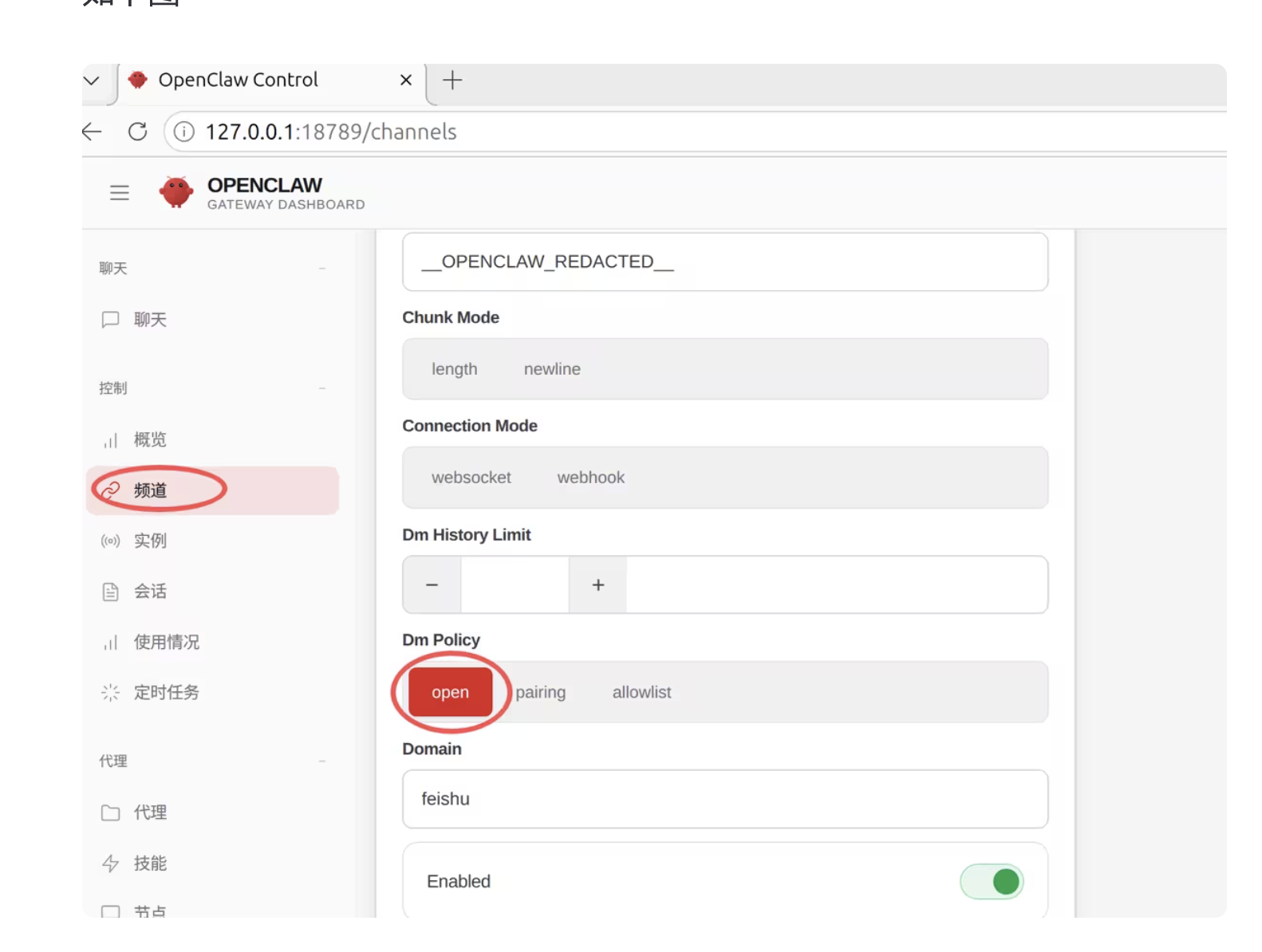
解决方法:在 openclaw control 网页里左侧找到「频道」,Dm Policy 选择 open,下拉点击 save。
Windows 安装报错 3221225477(node-llama-cpp 编译失败)
现象:npm install -g openclaw 报错:
npm warn cleanup   ]
npm error code 3221225477
npm error path C:\Users\Administrator\AppData\Roaming\npm\node_modules\openclaw\node_modules\node-llama-cpp
npm error command failed
npm error command C:\Windows\system32\cmd.exe /d /s /c node ./dist/cli/cli.js postinstall
npm error [node-llama-cpp] A prebuilt binary was not found, falling back to using no GPU
npm error A complete log of this run can be found in: C:\Users\Administrator\AppData\Local\npm-cache\_logs\2026-03-07T05_26_51_040Z-debug-0.log
目前的社区反馈显示,Node.js 24 在 Windows 上运行此类原生模块时极易出现 3221225477 错误。
方案一:改用 Node.js 22.x LTS
- 建议卸载当前的 Node.js,安装 Node.js 22.x LTS 版本
- 重新安装后,清理缓存并重试:
npm cache clean --force
npm install -g openclaw@latest
方案二:绕过本地编译(如果你只使用云端模型)
如果你不需要在本地运行大模型(比如你只打算用 Claude/GPT 的 API),可以跳过导致崩溃的 postinstall 脚本:
npm install -g openclaw@2026.3.2 --ignore-scripts
注意:这会导致 node-llama-cpp 无法正常工作,即你不能在本地运行 GGUF 模型,但 OpenClaw 的其他功能(云端模型、网关等)仍可正常使用。
安装时 Git SSH 网络错误
现象:npm i -g openclaw 报 git 错误:
npm error code 128
npm error An unknown git error occurred
npm error command git --no-replace-objects ls-remote ssh://git@github.com/whiskeysockets/libsignal-node.git
npm error git@github.com: Permission denied (publickey).
npm error fatal: Could not read from remote repository.
npm error Please make sure you have the correct access rights
npm error and the repository exists.
原因:openclaw 的某个依赖包(libsignal-node)试图通过 SSH 协议从 GitHub 下载代码,但你的电脑没有配置 GitHub 的 SSH Key(公钥)。系统想通过 git@github.com 这个"加密通道"去抓取代码,但 GitHub 不认识你的电脑,所以拒绝了访问。在你的网络环境下,连接 GitHub 的 443 端口(HTTPS/SSH)超时也会触发同样的问题。
以下是几种有效的解决方法,按推荐程度排序:
方法一:强制将 Git 的 SSH/Git 协议替换为 HTTPS(最推荐)
很多时候,npm 会尝试用 SSH 协议连接 GitHub,而你可能没有配置 SSH Key 或者 SSH 端口被封。运行以下命令让 Git 始终使用 HTTPS:
git config --global url."https://github.com/".insteadOf "git://github.com/"
git config --global url."https://github.com/".insteadOf "ssh://git@github.com/"
npm cache clean --force
然后再运行:
npm i -g openclaw
方法二:更改系统 DNS
如果 HTTPS 方式仍然超时,可以尝试更换系统 DNS(如 223.5.5.5、119.29.29.29 等国内公共 DNS)后重试。
方法三:手动安装依赖项
如果 libsignal-node 依然报错,可能是因为它需要编译环境。你可以尝试先安装这个特定的依赖包,有时 npm 会跳过 Git 源码去寻找预编译版本:
npm install -g libsignal-node
npm install -g openclaw
补充问题:清理 npm 缓存
如果运行方法一后依然报错 “git check-ignore…” 或权限问题,请尝试清理一下 npm 缓存后再安装:
npm cache clean --force
npm i -g openclaw
验证与自查
- 配对码问题:Dm Policy 设为 open 后,重新给飞书机器人发消息,不再循环提示配对码
- 3221225477 错误:换用 Node.js 22.x LTS 或
--ignore-scripts安装后,npm install -g openclaw不再报错,openclaw --version正常输出版本号 - SSH 网络错误:执行
git config --global url."https://github.com/".insteadOf "ssh://git@github.com/"后,npm i -g openclaw能正常完成 - 本地 GGUF 模型(如用了
--ignore-scripts):确认云端模型与网关功能正常,本地模型不可用属预期